

Solo farming only gets you so far. At some point, your garden grows, but the guild leaderboard barely moves. That’s where guilds come in.
Guilds are one of the biggest new features in Grow a Garden 2. The original game never had them. Now, they sit at the center of the whole multiplayer experience, alongside stealing mechanics and other co-op mechanics the sequel introduced. This Grow a Garden 2 Guilds Guide covers everything. How to join a guild in Grow a Garden 2, how to create a guild in Grow a Garden 2, how to manage your team, and how to earn every reward on offer.
Quick answer: Joining a guild is free. Creating one has a Robux cost of 99. That’s the short version. Now let’s break it all down.
What Are Guilds in Grow a Garden 2?
A guild is a team. Players join together, pool their harvests, and climb the guild leaderboard as a group instead of grinding alone. Every guild runs through the Gilbert NPC, who stands at the Guild Stand in the central hub, right next to the Sell Stand and the Props Shop.
Guilds add real structure to cooperative gameplay. You get shared goals, a weekly guild competition, and rewards that solo players simply can’t reach. This system is brand new to the franchise. That’s a big reason players are sticking around this sequel.
| Solo Play | Guild Play |
| No shared goals | Weekly guild competition |
| No guild rewards | Exclusive pets, eggs, seed packs |
| Progress alone | Progress as a team |
| No guild points system | Earn guild points through harvesting |
How to Join a Guild in Grow a Garden 2
Joining is the easy part, and it costs nothing. Is joining a guild free? Yes, always. You just need someone to send you an invite. Once that invite lands, you’re one click away from being part of a team.
There are two halves to this process: finding a guild, and accepting the invite once you get one. Let’s cover both.
How to Find a Guild
Not everyone has a friend group ready to go. Here’s how to recruit guild members on Discord, and where else to look:
- Global Chat recruitment. Ask on a public server. This works more often than you’d think.
- Discord server. Check the official looking-for-guild channel. Owners post recruitment listings there daily.
- Guild website (gag.gg). Search active members and message them directly.
- Watch public servers. Some guild owners invite active players they notice mid-session.
Pro tip: Check a guild’s requirements before you message the owner. Some guilds ask for a minimum Sheckle earnings balance or active playtime before sending an invite.
How to Accept a Guild Invite
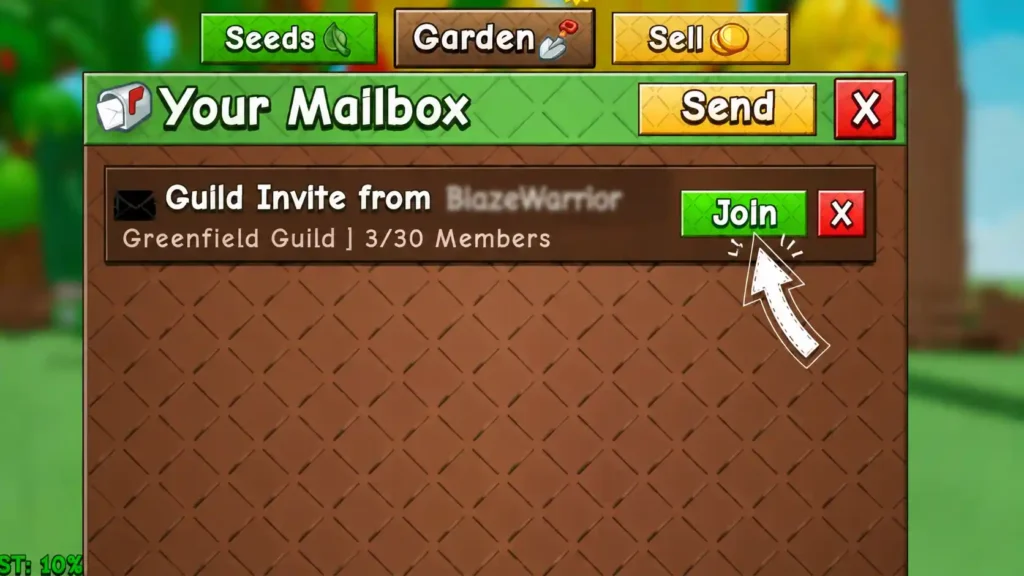
Once someone sends a mailbox invite, here’s exactly what to do:
- Walk to the mailbox next to your garden.
- Interact with it (press E).
- Open the Mail tab.
- Find the guild invite in your Invite tab.
- Click Join.
Done. The moment you accept, you’re dropped straight into the guild’s active weekly challenge. Every crop you harvest now counts toward your team’s guild total score.
How to Contribute Points to Your Guild
How do you get guild points? This confuses a lot of new players. Scoring isn’t about how many crops you sell. It’s about harvest weight.
Your score equals points per gram on your single heaviest harvested plant. Growing fifty average tomatoes won’t help nearly as much as one massive, mutated plant. You also need to beat your own single inventory sale record for it to count again.
How to contribute points to your guild — 3 quick tips:
- Use a Legendary Sprinkler or Super Sprinkler to boost plant growth before harvest.
- Farm during favorable weather events, since some boost crop size directly.
- Equip pet multipliers before harvesting your biggest candidate plant.
“I used to sell everything the second it was ready. Once I learned points only count your biggest single harvest, I started saving my best Rainbow Seed and Gold Seed plants for the reset. My guild’s score jumped almost overnight.” — a Grow a Garden 2 player, shared in the community Discord server
How to Get and Use the Megaphone in Grow a Garden 2
Here’s a bonus tip most guides skip. The Megaphone item lets you broadcast messages, including a custom Sound ID, across your garden. Guild leaders use it to call for recruits or hype up the team before a big harvest push.
How to get the Megaphone in Grow a Garden 2? Check the item shop or event rewards, then equip it from your inventory. Interact with it to play your chosen Sound ID. It’s a small feature, but it makes your guild stand out during Global Chat recruitment pushes.
How to Create a Guild in Grow a Garden 2
Prefer to run the show yourself? Where is the guild NPC located? Head to the central hub and find Gilbert at the Guild Stand. Select “Create Guild,” then set your guild tag, guild description, and guild name (3–24 characters).
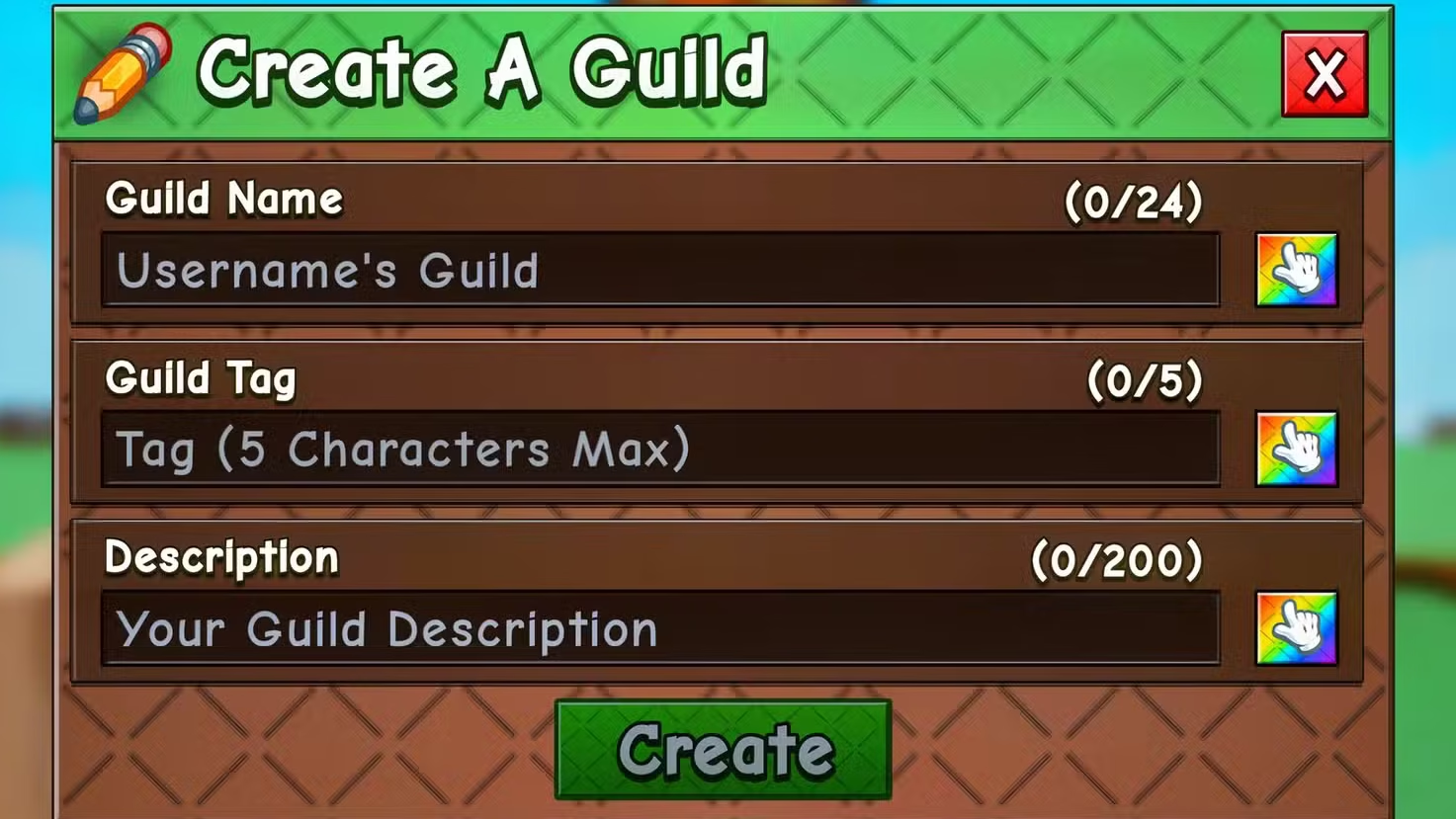
Once confirmed, you’ll pick a guild icon and choose three guild colors. This is your team’s identity. It’s the first thing recruits see before requesting an invite through the guild counter.
Guilds Cost Robux
How much does it cost to create a guild? There’s no way around this one. Creating a guild has a flat Robux cost of 99. There’s no Sheckle-based option, no matter how much Sheckle earnings you’ve stacked up.
So who should spend the Robux? If you already have an active friend group, creating your own guild gives you full control. If you’re casual or free-to-play, joining an existing guild through a free invite gets you the same guild rewards without spending a cent.
Guild Roles & Permissions
What are the guild roles and permissions? Every guild runs on three tiers: Owner role, Elder role, and Member role. Each comes with different guild permissions.
Only the Owner can edit the guild’s name, tag, description, colors, and icon. Changing the name triggers a mandatory 7-day cooldown. Elders handle invites and guild management but can’t touch core settings. Members contribute points and can leave anytime, but can’t manage anyone else.
| Role | Can Invite | Can Edit Guild | Can Kick/Ban | Can Disband |
| Owner role | ✅ | ✅ | ✅ | ✅ |
| Elder role | ✅ | ❌ | ✅ (limited) | ❌ |
| Member role | ❌ | ❌ | ❌ | ❌ |
One more thing: the Owner can never leave directly. Can the guild owner leave the guild? No. They must disband the guild instead, which removes every member for good.
How to Invite Someone to Your Guild
Once your guild exists, filling it with active players comes next. Return to the Guild Stand, talk to Gilbert, and click View Guild. Hit the Invite tab, then select players from your current server.
Only Owners and Elders can send invites. If you want trusted friends helping recruit, promote them first through rank promotion. If someone isn’t in your lobby, set up a private server and invite them there.
How to Accept an Invite
This is the quick version for anyone who just wants the steps. Here’s your checklist:
- Walk to your garden’s mailbox.
- Open the Mail tab and check for a pending mailbox invite.
- Click Join.
- Start earning guild points immediately through normal harvesting.
Managing Your Guild
Running a guild means more than inviting people and walking away. Active guild management keeps your team competitive and your roster clean. Every tool below lives at the guild counter.
Each action works a little differently depending on your role, so let’s cover them one at a time.
How to Edit a Guild
Click Edit at the Guild Stand. From there, change your guild tag, guild description, guild icon, and guild colors anytime, remembering the 7-day cooldown on name changes.
How to Rank Someone in Your Guild
Want to promote a trusted member? How to rank someone in your guild: open their profile and click Rank for a rank promotion. Only give Elder status to players you genuinely trust.
How to Kick Someone From a Guild
Inactive or disruptive members don’t have to stay. Owners and Elders can kick member or ban player through the same management menu used for ranking.
How to Leave a Guild
Any Member or Elder can leave whenever they like. Talk to Gilbert, select View Guild, find your name, and press leave. Confirm once more, and you’re out.
How to Disband a Guild
What happens when you disband a guild? This is permanent. Only the Owner can disband guild status, and doing so deletes it entirely, removing every member at once. Think it through first.
How to Expand Guild Member Slots
Every guild starts with limited member slots. What is the maximum guild size? The guild capacity caps at 50 members. To grow past your starting slots, buy more using Robux one tier at a time, following standard guild slot pricing.
| Slot Packs | Slots Added | Approximate Robux Cost |
| Individual Slot | 1 | 37–499 (scales) |
| Small Pack | +5 | 245 |
| Medium Pack | +10 | 490 |
| Large Pack | +20 | 980 |
How Guild Competitions Work in Grow a Garden 2
How does the guild competition work? Every guild competes in a weekly challenge based on farming output. The math is simple: you earn points per gram on your heaviest harvested plant. Your guild total score is every member’s best individual score added together.
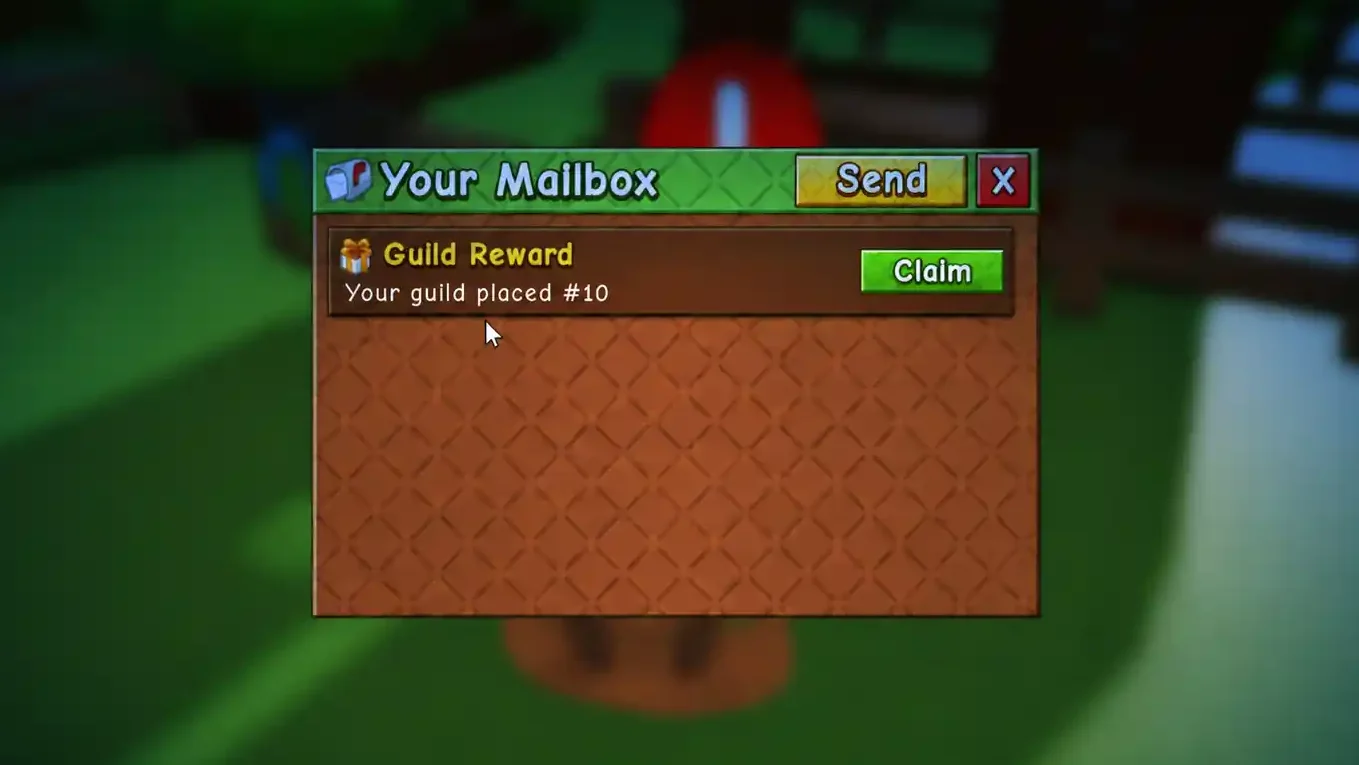
This is why coordination matters. Some weeks bring a Biggest Plant challenge, others bring a Cash Crop challenge based on selling. At the end of each cycle comes the weekly reset, and rewards get calculated based on final leaderboard rank, then delivered straight to your mailbox.
The cycle in short: harvest your biggest plant → weight gets calculated → points get added → weekly reset happens → rewards get mailed based on guild placement.
All Guild Rewards in Grow a Garden 2
What rewards do you get for guild rank 1? Rewards are the whole reason competitive guilds push hard every week. The better your final leaderboard rank, the bigger your prize, and the gap between top spots and the middle of the reward pool is significant.
Guild Rewards Summary
How do guild rewards work? Known rewards include some of the rarest pets in the game, plus useful hatching materials.
- Ice Serpent pet (Huge, Big, or standard tiers by rank)
- Black Dragon pet
- Rainbow Egg
- Common Egg
- Rare Seed Pack
- Legendary Seed Pack
A Huge Rainbow Ice Serpent typically goes to the top guild. Third place might land a Big Rainbow version instead. Even ranking 4th to 10th still earns a solid Ice Serpent tier for a coordinated team effort.
Guild Rewards This Week
What is this week’s guild challenge? Reward tiers shift weekly depending on whether it’s a Biggest Plant challenge or Cash Crop challenge. Do guild rewards change every week? Yes, every single cycle. Bookmark this section and check back often if you’re chasing a specific pet tier.
Guild Benefits in Grow a Garden 2
Beyond weekly prizes, guilds may offer long-term perks too. Based on available information, guild points could unlock a full guild upgrade tree, including a Movement Speed upgrade, Jump Height upgrade, and Shovel Power upgrade shared across the whole team.
These upgrades would benefit every member equally. Future updates may also bring shared storage, guild cosmetics, or guild-versus-guild events, though none of that is confirmed yet. Worth watching as the game evolves.
FAQs About Grow a Garden 2 Guilds
How do you get guild rewards in Grow a Garden 2?
You earn rewards by ranking high in the weekly guild competition. Your harvest weight feeds into the guild total score.
How do you find a guild to join in Grow a Garden 2?
Try Global Chat recruitment, the official Discord server, or the guild website (gag.gg) to find active recruiters.
Do Grow a Garden 2 guild rewards change every week?
Yes. Both the challenge type and the reward pool rotate on a weekly reset.
How much does it cost to create a guild?
Always 99 Robux. That Robux cost never changes, and there’s no Sheckle option.
What is the maximum guild size?
Fifty members total, though you’ll need to buy extra member slots to hit that guild capacity.
Can the guild owner leave the guild?
No. Owners must disband guild status instead, which removes everyone permanently.
How to maximize guild points?
Focus on mutated plants, use a Legendary Sprinkler, and always beat your last single inventory sale record before selling again.
Final Words
Guilds turn Grow a Garden 2 from a quiet solo farming sim into a real team game. Whether you’re chasing an Ice Serpent pet or just want people to grind alongside, joining or creating a guild is one of the best moves you can make right now.
New and unsure? Start by joining an existing guild for free. It costs nothing, and you’ll still climb the guild leaderboard with everyone else. Once you’ve got a solid crew, creating your own guild for 99 Robux gives you full control over recruitment and your team’s identity.
Got a guild that’s actively recruiting? Drop it in the comments below. Still hunting for teammates? This is a great place to start.
Keep Exploring Grow a Garden 2 🌱
Grow a Garden 2 Amber Cranberry: Price, 0.07% Stock Odds, Amber Mutation & Full Value Breakdown (2026)
August 9, 2026
Grow a Garden 2 Atlantic Giant Pumpkin: Price, Stock Chance, Infinite Growth & Is It Worth 600,000 Leaves?
August 9, 2026

Grow a Garden 2 Magic Mail Guide: Every Tier, Price, and How to Use It Before Fall Harvest Closes (2026)
August 8, 2026
Grow a Garden 2 Admin Party: Complete Guide to Minigames, Party Points & Admin Chest Rewards (2026)
August 6, 2026